

Using Yari Flow with Shopify’s new customer accounts
Activate Yari Flow My Account
To direct customers from Shopify’s default account area to Yari Flow My Account:
- In Shopify Admin, open your theme settings.
- Go to App embeds.
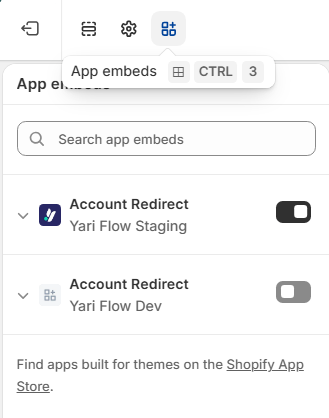
- Find Account Redirect.
- Enable the app embed.
- Save your changes.
Once enabled, links to shopify default/account will redirect customers to the Yari Flow My Account experience at /a/account.
Important: Review any account links used in your navigation, emails or campaigns to make sure they direct customers to the correct account experience.
Configure the Customer account main menu
To customise the menu customers use to access the My Account, go to: Shopify Admin → Content → Menus
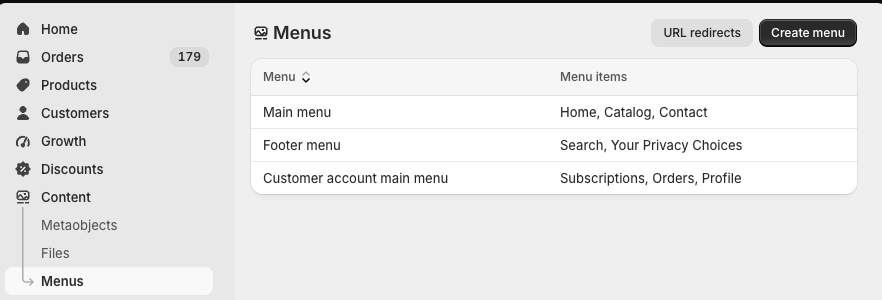
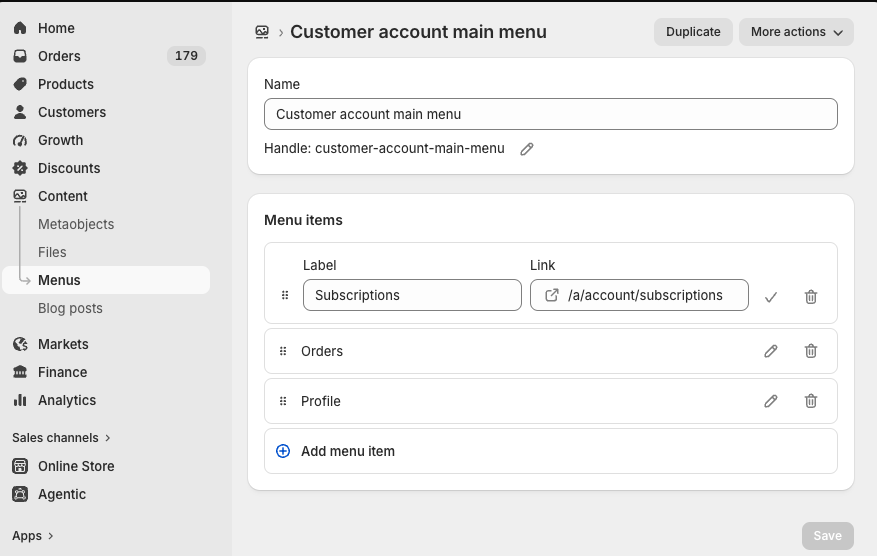
Create or open a menu called Customer account main menu. From here, you can add, edit or reorder the menu items shown to customers.

Powered by
