

Shipping settings
Managing Shipping & Subscription Shipping Rates
Yari Flow integrates directly with your Shopify shipping profiles and delivery zones. Through the Shipping dashboard, you can control which shipping methods apply to recurring subscription orders and set overall calculation rules.
To access your Shipping, navigate to Manage Settings > Shipping in the left sidebar.
How Yari Flow Manages Shipping
Rather than requiring you to rebuild shipping zones from scratch, Yari Flow mirrors your existing Shopify shipping configuration and provides granular control over recurring orders.
1. Syncing with Shopify
Whenever you update shipping zones, add new destinations, or change rates within your Shopify Admin, click the Sync button in the top-right corner of the Shipping page. This ensures Yari Flow always reflects your live Shopify setup.
2. Setting a Shipping Price Strategy
Under Shipping Price Settings, you can choose how Yari Flow calculates shipping for recurring subscription orders.
- Min Strategy: Automatically selects the lowest-priced eligible shipping rate available for the customer's zone on recurring orders.
3. Enabling or Disabling Specific Rates
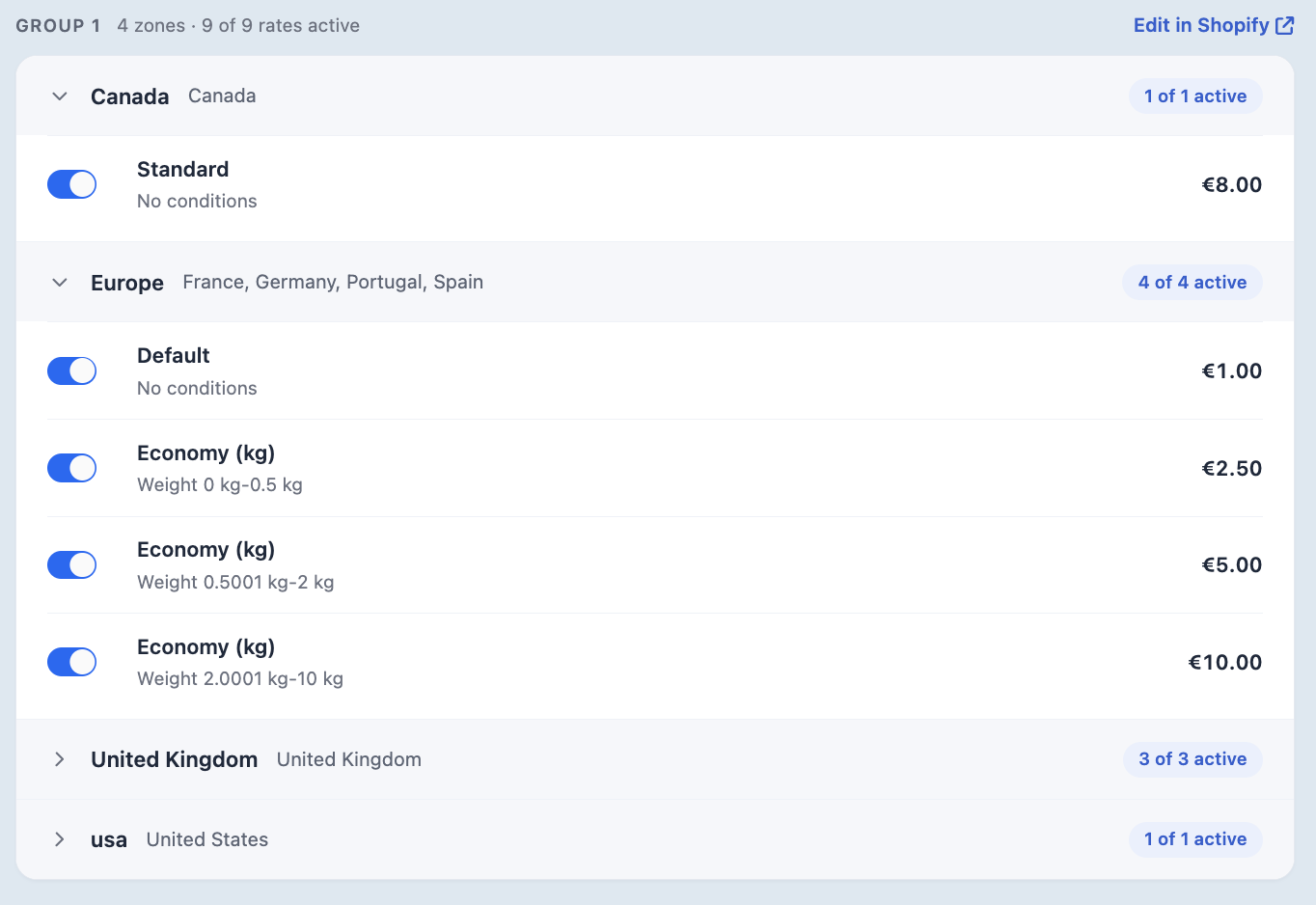
You can toggle individual shipping methods ON or OFF for recurring orders across each shipping zone (e.g. Canada, Europe, United Kingdom, USA):
- Active (Blue Toggle): The shipping rate is available for recurring subscription charges.
- Inactive (Grey Toggle): Deactivates the shipping method for recurring orders. This is ideal if you want to offer expedited shipping for initial checkouts but prevent fast/expensive methods from applying to automated renewals.
How Shopify Handles Subscription Shipping at Checkout
Because Yari Flow uses Shopify’s native checkout engine, shipping rate selection follows Shopify’s core subscription rules:
Subscription-Only Carts
When a customer purchases only subscription items:
- First Order: The customer selects their preferred shipping method and rate at checkout.
- Recurring Orders: Shopify automatically applies the rate determined by your Yari Flow strategy (such as the minimum available rate) from the methods you have enabled.
Mixed Carts (One-Time + Subscription Items)
If a cart contains both one-time items and subscription products:
- Separate Shipping Lines: Shopify calculates shipping for one-time products and subscription items separately. Customers will see separate shipping lines at checkout, one for immediate delivery and a preview line for recurring shipments. Shopify cannot merge these into a single charge.
- Generic Labels: If one-time and subscription items qualify for identical rates, Shopify may display a generic "Shipping" label instead of individual carrier names.
Recurring Order Calculations
- Rates Calculated per Selling Plan: Shipping is calculated separately for each Selling Plan or delivery schedule. If a subscription contract includes products on different delivery schedules, separate shipping charges may apply unless an override is set.
- Carrier Selection: Yari Flow does not directly select carriers for recurring shipments. Carrier selection and fulfilment rules are managed by Shopify or your connected third-party shipping applications.

