

General settings guide
Configure Settings in Yari Flow
The Settings page contains account-level controls for subscription limits, administrative messages, failed payment retries, out-of-stock handling and other operational behaviour.
Before you start
You must have the appropriate user permissions to update Yari flow settings.
Some changes may affect existing subscriptions and future subscription activity. Review each setting carefully before saving it.
How do I open the Settings page?
1. In the left-hand menu of the Yari Flow Dashboard, open Manage Settings.
2. Select Settings.
3. Find the section you want to update.
4. Select Edit in the upper-right corner of that section.
The Settings page is divided into the following sections:
- Subscription
- Messaging
- Cookies
Subscription settings

The Subscription section controls general rules applied to subscription management and subscription orders.
Maximum products in a subscription
Use Max. products in a subscription to limit how many products can be included in one subscription.
If no value has been configured, the setting displays Not set.
Maximum subscription delivery delay
Use Max number of days subscription delivery can be delayed to control how far a subscription delivery can be postponed.
For example, a value of 90 days means that a delivery cannot be delayed by more than 90 days.
Valid pause periods
Use Valid Pause Periods to control the pause options available for subscriptions.
Subscription order tags
You can configure different Shopify order tags for initial and recurring subscription orders:
- Subscription First Order: The tag associated with a customer’s first subscription order
- Subscription Recurring Order: The tag associated with subsequent recurring subscription orders
These tags can help your team and connected systems distinguish initial subscription orders from recurring orders.
Voucher stacking
Use Allow stacking vouchers to control whether more than one voucher can be applied.
When this setting is disabled, voucher stacking is not permitted.
Messaging settings
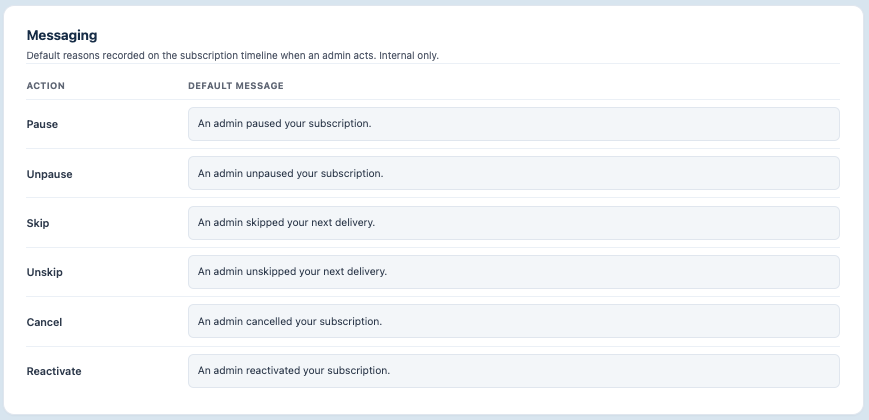
The Messaging section contains the default customer-facing messages used when an administrator changes a subscription.
You can configure default messages for the following actions:
- Pausing a subscription
- Unpausing a subscription
- Skipping the next delivery
- Reversing a skipped delivery
- Cancelling a subscription
- Reactivating a subscription
Examples include:
- “An admin paused your subscription.”
- “An admin skipped your next delivery.”
- An admin reactivated your subscription.”
Keeping these messages clear and specific helps customers understand changes made by your team.
Cookie settings

The Cookies section displays the expiration periods used for authentication tokens and browser cookies.
It includes:
- JWT Default Expiration: How long the authentication token remains valid
- Cookie Default Expiration: How long the relevant browser cookie remains valid
These settings help control how long a user can remain authenticated before they need to sign in again. These values cannot be changed and are provided for informational purposes only.

