

Billing Settings & Payment Recovery
Configure Billing Settings in Yari Flow
The Billing Settings area controls when recurring billing runs and how Yari Flow handles failed payments, unavailable products and discontinued products.
To access it:
1. In the Yari Flow Dashboard, go to Manage Settings.
2. Select Billing.
The Billing Settings page is divided into four areas:
- Schedule
- Failed payments dunning
- Out of stock dunning
- Discontinued products
Configure the Billing Schedule

The Schedule section controls when recurring billing and billing reminder jobs run for your store.
Shop timezone
The Shop timezone determines the local time used for billing schedules and reminders.
Make sure this matches the timezone your store operates in before configuring the billing run times.
Recurring billing
Recurring billing processes subscriptions scheduled for billing.
You can:
- Enable or disable recurring billing
- Choose the daily run time
The configured time uses the selected Shop timezone.
Billing reminder
The Billing reminder sends reminder messages for subscriptions approaching their billing date.
You can:
- Enable or disable the reminder
- Choose the daily run time
The current interface states that reminders are sent for subscriptions scheduled to be billed in approximately three days.
Failed Payments Dunning
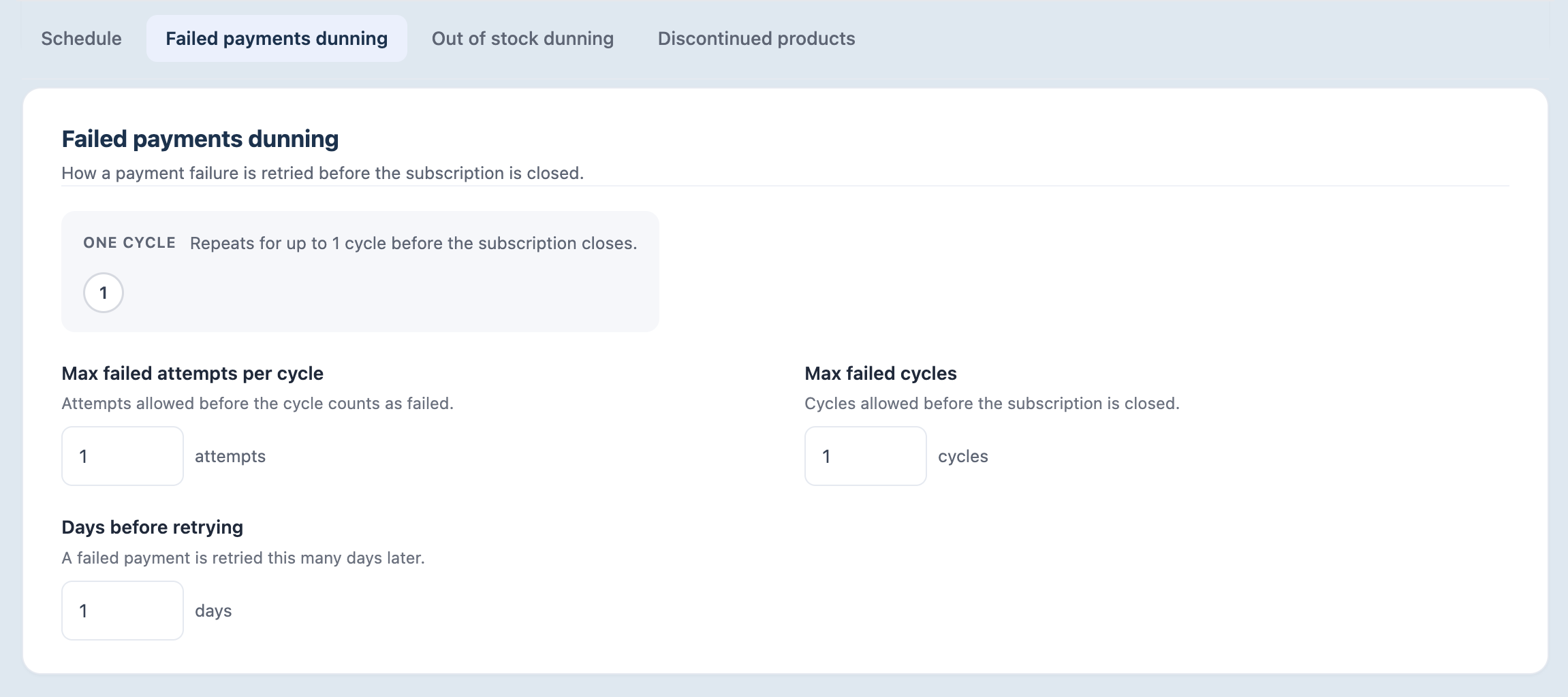
Failed Payments Dunning controls how Yari Flow retries recurring subscriber payments that fail.
This is different from the Billing Schedule:
- Billing Schedule determines when recurring billing runs.
- Failed Payments Dunning determines how an unsuccessful payment is retried.
Yari Flow organises failed payment retries into attempts and cycles.
Max failed attempts per cycle
Max failed attempts per cycle controls how many payment attempts Yari Flow can make before that retry cycle is considered unsuccessful.
Days before retrying
Days before retrying controls how long Yari Flow waits between failed payment attempts.
For example, if this is set to 1, Yari Flow waits one day before trying the payment again.
Max failed cycles
Max failed cycles controls how many unsuccessful retry cycles Yari Flow allows before the recovery process ends.
The current Yari Flow interface states that once the configured number of cycles has been exhausted, the subscription is closed.
Example
A configuration could use:
- Max failed attempts per cycle: 2
- Days before retrying: 1 day
- Max failed cycles: 1
In this example, Yari Flow can make up to two payment attempts within the cycle, with one day between attempts. If the cycle fails, the subscription reaches the end of the configured recovery process.
Important: Review your retry settings carefully. Very short retry periods may result in several charge attempts within a short period, while very long retry periods may delay payment recovery.
Out of Stock Dunning
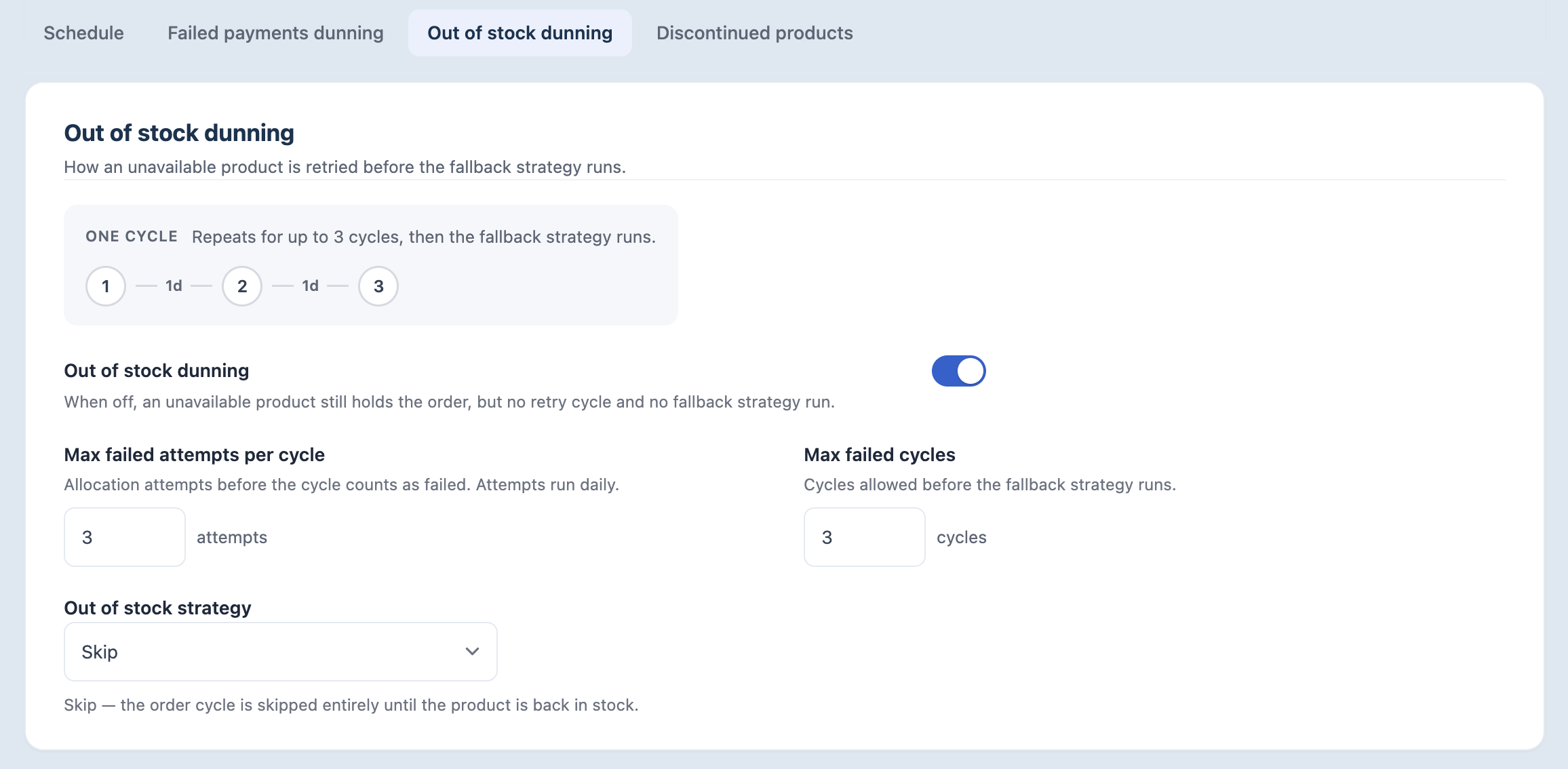
Out of Stock Dunning controls how Yari Flow handles recurring orders when a required product is unavailable.
This is separate from Failed Payments Dunning because the payment itself has not necessarily failed. Instead, Yari Flow cannot complete the recurring order because stock is unavailable.
Enable or disable Out of Stock Dunning
When Out of Stock Dunning is enabled, Yari Flow retries the unavailable product according to the configured attempts and cycles before using the selected fallback strategy.
When it is disabled, an unavailable product can still hold the order, but Yari Flow does not run the retry cycle or fallback strategy.
Max failed attempts per cycle
This setting controls how many allocation attempts Yari Flow makes before the out-of-stock cycle is considered unsuccessful.
The current interface states that these attempts run daily.
Max failed cycles
This controls how many unsuccessful cycles Yari Flow runs before applying the selected Out of Stock Strategy.
Out of Stock Strategy
The Out of Stock Strategy determines what Yari Flow should do when the product remains unavailable after the configured retries.
The available options are:
- Not set
- Skip
- Random Variant
Skip
Choose Skip when you do not want Yari Flow to automatically replace an unavailable product.
With this strategy, the order cycle is skipped when the required product remains unavailable.
This may be appropriate when:
- Customers expect a specific product or variant
- Substitutions could create confusion
- Flavour, size, formulation or other product characteristics are important
- You do not want Yari Flow choosing an alternative product automatically
Random Variant
Choose Random Variant when an unavailable variant can be replaced with another available variant.
Yari Flow selects an in-stock variant as the substitute.
Before using this option, make sure all potential replacement variants are suitable alternatives.
Consider differences such as:
- Flavour
- Size
- Colour
- Price
- Quantity
- Ingredients or allergens
- Customer preferences
Important: Only use Random Variant when any eligible replacement is appropriate for the customer. Automatically substituting a materially different product may create an unexpected customer experience.
Discontinued products

The Discontinued products setting controls how Yari Flow handles products that are no longer sold but remain part of an existing subscription.
When this setting is disabled, the current interface states that the subscription continues billing normally even when a product is no longer sold. The order is not held and Yari Flow does not automatically remove the product from the subscription.
- Whether the order is held
- Whether the discontinued product is automatically removed
- Whether the remaining products continue to bill
- Whether the customer is notified
- Whether the merchant must take any further action
Failed payments and Out of Stock Dunning
Although both features use retry cycles, they solve different problems.
Configure each independently based on how you want your store to handle payment failures and inventory shortages.
Before changing Billing Settings
Billing settings can directly affect recurring orders and customer subscriptions.
Before saving changes:
- Confirm the Shop timezone
- Review when recurring billing runs
- Check the number and frequency of failed payment retries
- Review Out of Stock retry limits
- Make sure the selected Out of Stock Strategy is appropriate for every affected product
- Understand how discontinued products will be handled
Where possible, review the expected customer experience before making significant changes.
Frequently asked questions
What is the difference between recurring billing and Failed Payments Dunning?
Recurring billing processes subscriptions that are due for billing.
Failed Payments Dunning takes over when one of those recurring payment attempts fails and determines how Yari Flow should retry it.
What happens after the maximum number of failed payment cycles?
The current interface states that the subscription is closed after the configured number of failed cycles has been exhausted.
How often are out-of-stock products retried?
The current Out of Stock Dunning interface states that allocation attempts run daily.
The number of attempts within each cycle and the maximum number of cycles can be configured.
What happens when an out-of-stock product never becomes available?
After the configured attempts and cycles have been exhausted, Yari Flow applies the selected Out of Stock Strategy.
The resulting behaviour depends on whether you have selected Skip, Random Variant or another available strategy.
Can I turn Out of Stock Dunning off?
Yes.
When disabled, an unavailable product can still hold the order, but Yari Flow does not run the retry cycle or fallback strategy.

