

Analytics Dashboard
What is included in Yari Flow's Dashboard Analytics?
The Yari Flow's Analytics Dashboard provides real-time subscription, revenue and customer performance data. The information available are:
Total Subscription Revenue
Total sales revenue from all subscription orders within the date range calculated by gross sales (product price × quantity) - (additional discounts) + (shipping) + (taxes). This includes revenue from new subscription checkouts, recurring orders, and one-time add-ons.
Current MRR
Monthly recurring revenue from active subscriptions.
Active Subscription
The total count of unique subscriptions with an Active or Paused status on the last day of the date range.
Daily/Weekly Revenue Breakdown
- Total Shopify Revenue
Total sales revenue from all Shopify orders within the date range calculated by gross sales (product price × quantity) - (additional discounts) + (shipping) + (taxes). This includes revenue from one-time purchases, new subscription checkouts, recurring subscription orders, and subscription add-ons.
- Total Subscription Revenue
Total sales revenue from all subscription orders within the date range calculated by gross sales (product price × quantity) - (additional discounts) + (shipping) + (taxes). This includes revenue from new subscription checkouts, recurring orders, and one-time add-ons.
Daily/Weekly Active Count
- Total Subscription Revenue
The total count of unique subscriptions with an Active status on the last day of the date range.
Net Subscription & Subscriber Change
The overall increase or decrease in your number of subscriptions OR subscribers.
- Net Subscription Change
The net change value is the difference in the active count from the start of the period to the end of the period. The starting value is the active sub count at the beginning of the start date, or the prior day's end of day value. Net change calculation: New subscriptions - (Entered Pause - Resumed - Exited Pause) - (Entered Dunning - Exited Dunning - Recovered) - (Cancelled - Reactivated)
- Net Subscriber Change
The total number of subscribers gained or lost between the last day of the compare-to period and the last day of the current period. This metric reflects changes in subscriber status rather than individual subscriptions.
Daily/Weekly Growth
- Net Subscription Change
The net change value is the difference in the active count from the start of the period to the end of the period. The starting value is the active sub count at the beginning of the start date, or the prior day's end of day value. Net change calculation: New subscriptions - (Entered Pause - Resumed - Exited Pause) - (Entered Dunning - Exited Dunning - Recovered) - (Cancelled - Reactivated)
Daily/Weekly Subscription Cancellation Rate
The % of subscriptions that cancelled on that day divided by the count of active subscriptions at the start of the day.
Daily/Weekly Breakdown
Overall Summary of the Revenue.
Data filtering
For filtering we give 3 different types:
- Date Selectors;
- Revenue Type;
- Daily OR Weekly format;
Date Selectors
Here we got 2 type of dates selectors which we can use to choose the period you want to include in the reports.

The right selector with the blue calendar icon is to select the period wanted. Available options, you may be able to select periods such as:

- This Week
- This Month
- Last Week
- Last Month
- Last 6 Months
- This Year
- Last Year
- Custom
While on the left selector with the orange icon is to select a period which you wish to compare with the right selector period. The available options for this selector are the following:
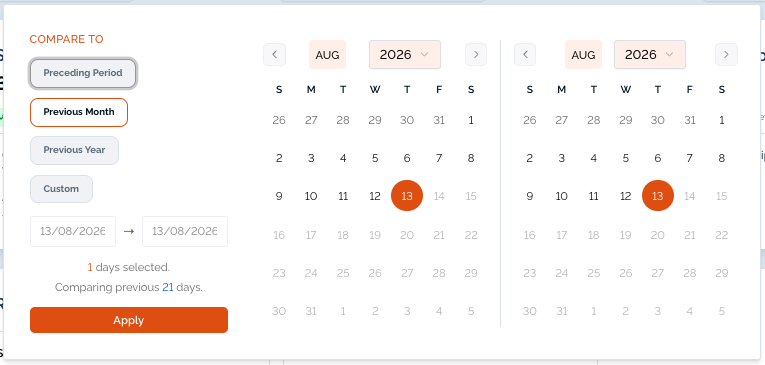
- Previous Period
- Previous Month
- Previous Year
- Custom
Revenue type & Daily/Weekly format
The revenue type selector is to specify which type or revenue is wanted to report. Options available are:
- Gross Revenue;
- Pre Tax Revenue;
- Net Product Revenue;
It can also be chosen if the report intended is presented has Daily Or Weekly.
Data Export
For more information related to this, we got a dedicated page for Data Exports

